
Fake Virus Scanner Antivirus 2009
Symptoms: Search on G, click on result. The Browser window disappears and dialog box appears. 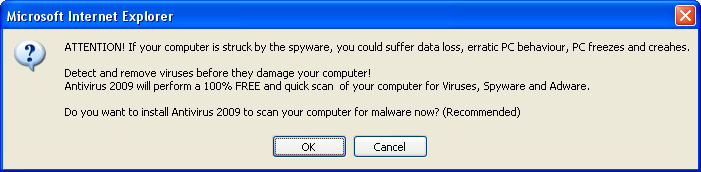
Closing this box via the Big Red X produces: 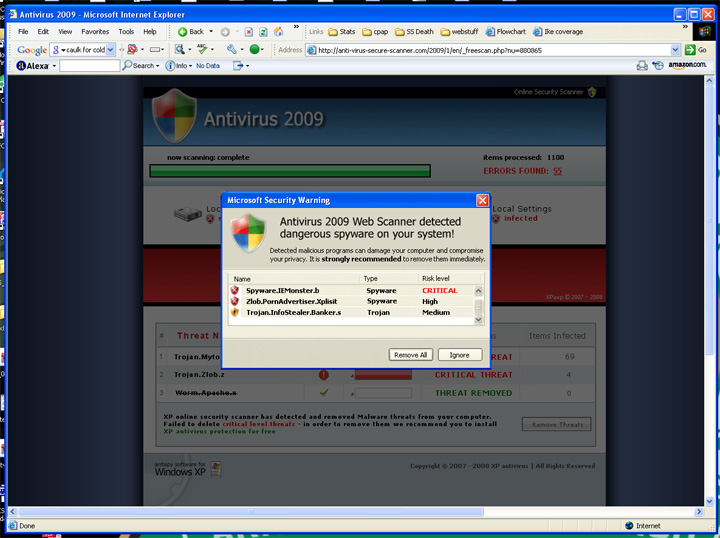
Closing the fake virus scan window via the Big Red X produces: 
and finally, closing that dialog via the Big Red X produces 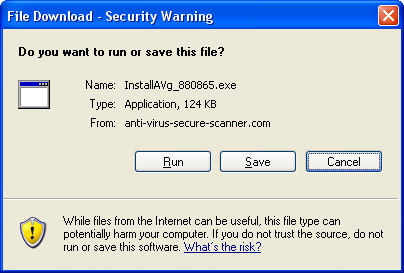
Which ends the attempt. If you see this happen to you, just be sure to click on the Big Red X in the upper right-hand corner to close the windows and prevent being infected. |
|
|
| Thanks for the info. I deleted an email (it was in spam folder) I received yesterday that could have been that. |
Ron, thanks for the heads up  |
| thanks so much Ron.... I sent it to Richard.
What a way to start 2009!!!!!!!! |
| "Destructive and damaging software "founded"?
Not saying it couldn't easily be overlooked but, as a rule, most legit error messages aren't in broken English. It pays to proofread! I just noticed also, Microsoft errors come up in American English so the word behaviour with a "u" in it is a red flag, too. |
| i had that virus a couple of months ago, i borrowed a memory pen from a friend with a patch on it ha to save downloading it incase i got a virus, how ironic! it go so bad that i couldnt hardly turn the computer on then after 2 days i had a new desk top with a big red x on it. i had my computer reinstalled and its ok now but i lost alot of pictures and documents. always back your things up. i learnt a hard lesson as i had just done all the advertising artwork for my partners, my father in laws and my business, all the business cards, menus ets all gone...gutted |
Didn't find exactly what you're looking for? Search again here:

Custom Search
|

|
| |
|
|
|
|
|